
Running a WooCommerce store is relatively simple when you have a small product catalog and only a few orders each day. But what happens when your store starts receiving dozens or hundreds of orders, your product catalog grows, customers request returns, inventory needs constant updating, and you also need accurate sales and accounting reports? At that point, your WooCommerce website is no longer the only system you need. You need a connected business-management solution that can bring ecommerce, inventory, invoicing, sales, and accounting together.
This is where WooCommerce POS integration becomes important. Instead of managing your online store, inventory, invoices, sales records, and accounting separately, an integrated POS or ERP system can connect these processes. WooCommerce currently has more than 4.1 million live installations, according to StoreLeads data published by WooCommerce in July 2026, which shows the scale of the platform and the importance of integrations for businesses operating on it.
For a growing business, the goal should not simply be to move an order from WooCommerce into another system. The more useful goal is to create a complete workflow where products can be managed centrally, WooCommerce orders can be processed efficiently, invoices can be generated, inventory can be maintained, returns can be handled, and financial information can be analyzed from one business-management system.

What Is WooCommerce POS Integration?
WooCommerce POS integration connects a WooCommerce online store with a point-of-sale, ERP, inventory, accounting, or business-management system. Instead of treating your website and back-office operations as completely separate systems, the integration allows relevant information to move between them.
For example, your WooCommerce website may receive an order from a customer while your POS or ERP system handles the operational side of that transaction. Depending on the integration, products, prices, customer information, orders, invoices, stock, returns, and financial records can be connected.
WooCommerce provides APIs that allow external systems to read and write store information, including products, orders, customers, coupons, and shipping zones. WooCommerce’s current documentation identifies REST API v3 as the recommended version for new integrations.
The important thing is that not every WooCommerce integration does the same job. Some plugins only synchronize products. Others transfer orders. More advanced solutions connect ecommerce with inventory, invoicing, sales, accounting, reporting, and other business operations.
That is why businesses should look beyond the phrase “WooCommerce integration” and ask a more practical question: What happens to my business data after the integration receives it?
Why Do Businesses Need WooCommerce POS Integration?
Imagine receiving an online order through WooCommerce. Someone needs to check the order, confirm the product, manage stock, prepare an invoice, process the sale, update the accounting records, and eventually include that transaction in financial reporting.
If all of these activities happen in different systems, employees may need to enter the same information repeatedly.
This creates unnecessary work and increases the possibility of errors. A product might have the wrong stock quantity, an invoice might be missed, a returned product might not be reflected correctly, or the sales report might not match the accounting records.
A connected POS or ERP system can turn these disconnected tasks into a workflow.
Instead of:
WooCommerce → Manual Data Entry → Invoice → Inventory Update → Accounting → Reports
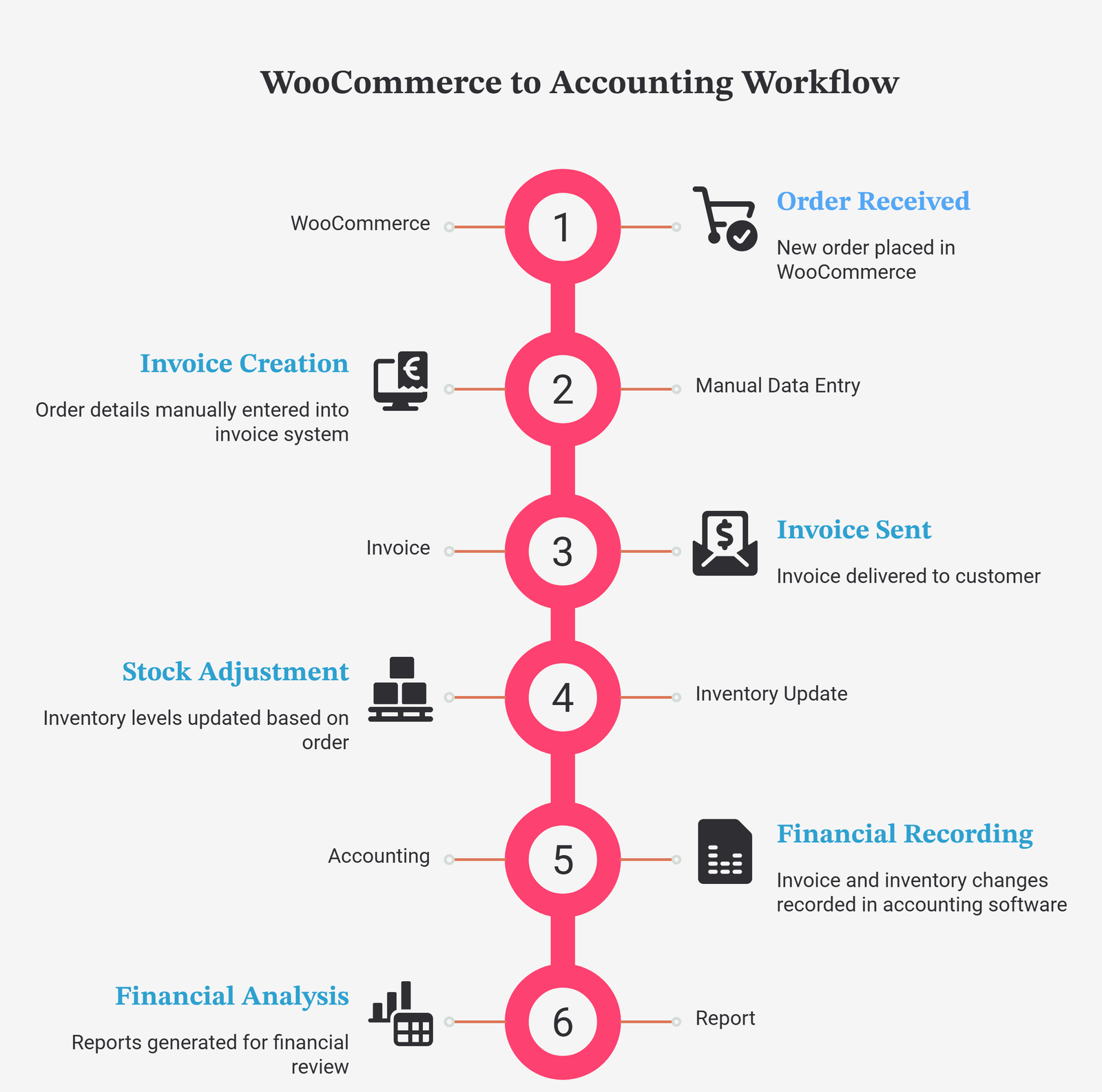
you can create a workflow such as:
WooCommerce → POS/ERP → Invoice → Inventory → Sales → Returns → Accounting → Reports
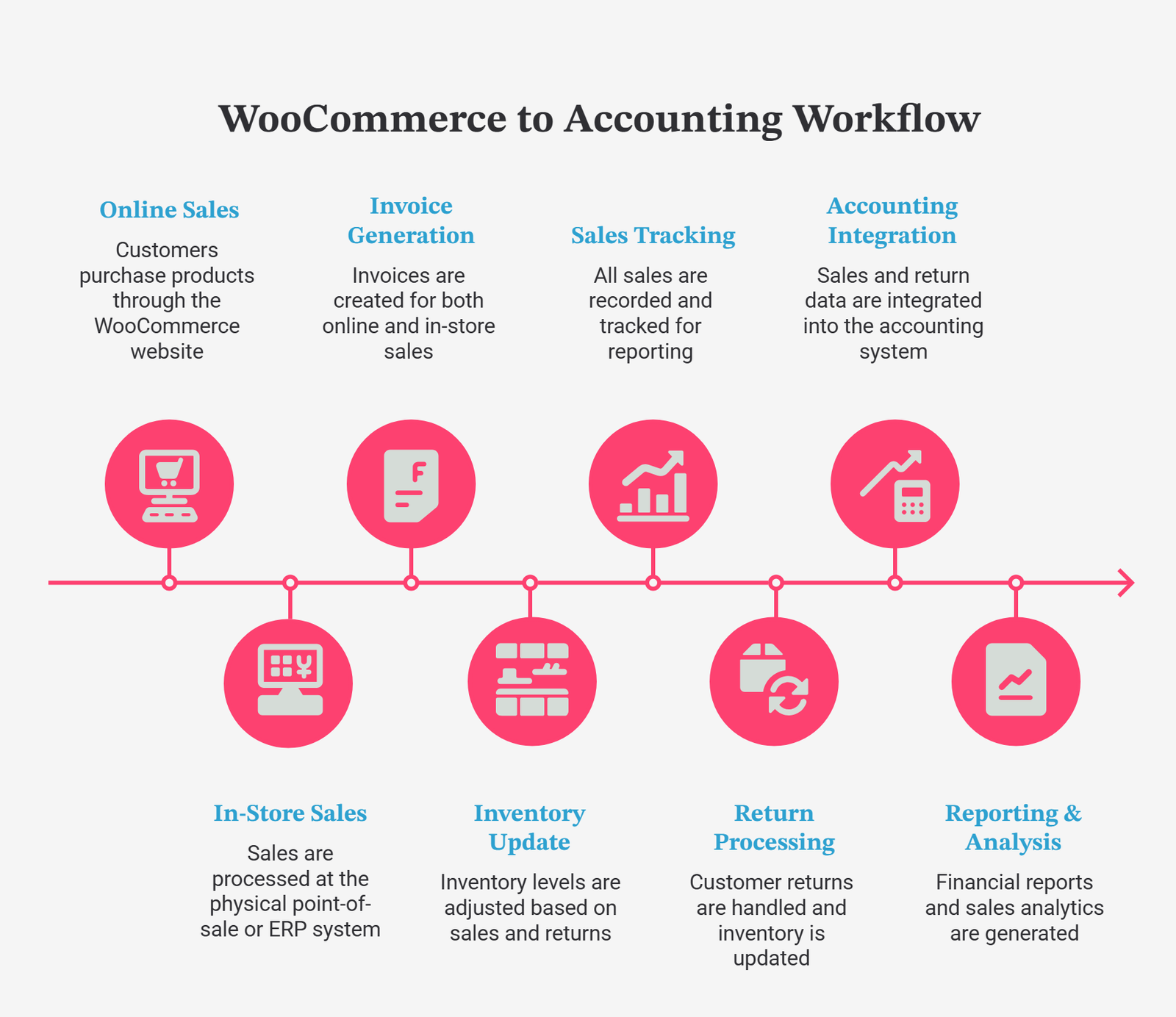
This is the real value of WooCommerce POS integration. It is not simply about connecting two pieces of software. It is about reducing repetitive work and creating a more organized business process.
What Should a WooCommerce POS Integration Include?
Before choosing an integration, look at the complete business workflow rather than focusing on one feature.
| Feature | Basic Integration | Advanced POS Integration | WC + ERP Integration |
|---|---|---|---|
| Product synchronization | Usually | Yes | Yes |
| Bulk product management | Limited | Often | Yes |
| Order synchronization | Yes | Yes | Yes |
| Automatic invoicing | Sometimes | Often | Yes |
| Inventory management | Limited | Yes | Yes |
| Sales management | Limited | Yes | Yes |
| Return management | Varies | Yes | Yes |
| Accounting | Rare | Depends on platform | Yes |
| Profit & loss reporting | Rare | Depends on platform | Yes |
| Activity/error logs | Varies | Often | Depends on integration |
| Multi-channel management | Limited | Better | Strong |
| ERP functionality | No | Sometimes | Yes |
The right solution depends on your business model. A small online shop may only need product and order synchronization. A retailer managing a large catalog, physical sales, ecommerce orders, returns, inventory, and accounting may need a complete ERP-backed integration.
Product Synchronization Between WooCommerce and POS
Product synchronization is one of the first things businesses should consider when evaluating a WooCommerce integration.
If you maintain products separately in WooCommerce and your POS, every product needs to be created, edited, priced, categorized, and updated in multiple places. That might be manageable with 20 products, but it becomes difficult with hundreds or thousands.
WooCommerce’s APIs provide programmatic access to product information, while its Store API also exposes customer-facing product data such as prices, images, and categories.
A centralized POS or ERP approach can make product management easier by allowing the business to maintain its main catalog in one system and synchronize it with WooCommerce.
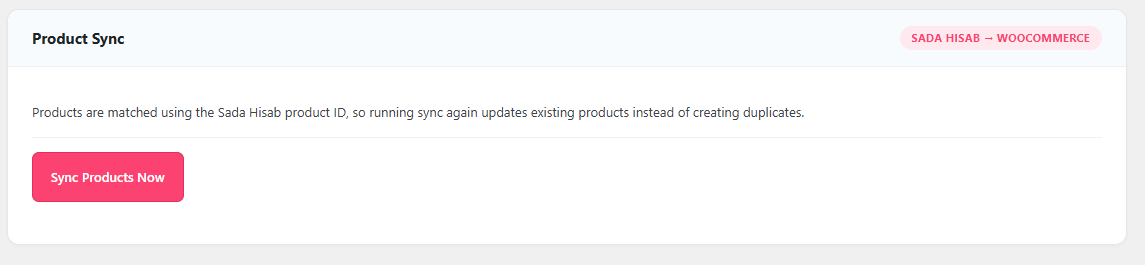
Sada Hisab Product Synchronization
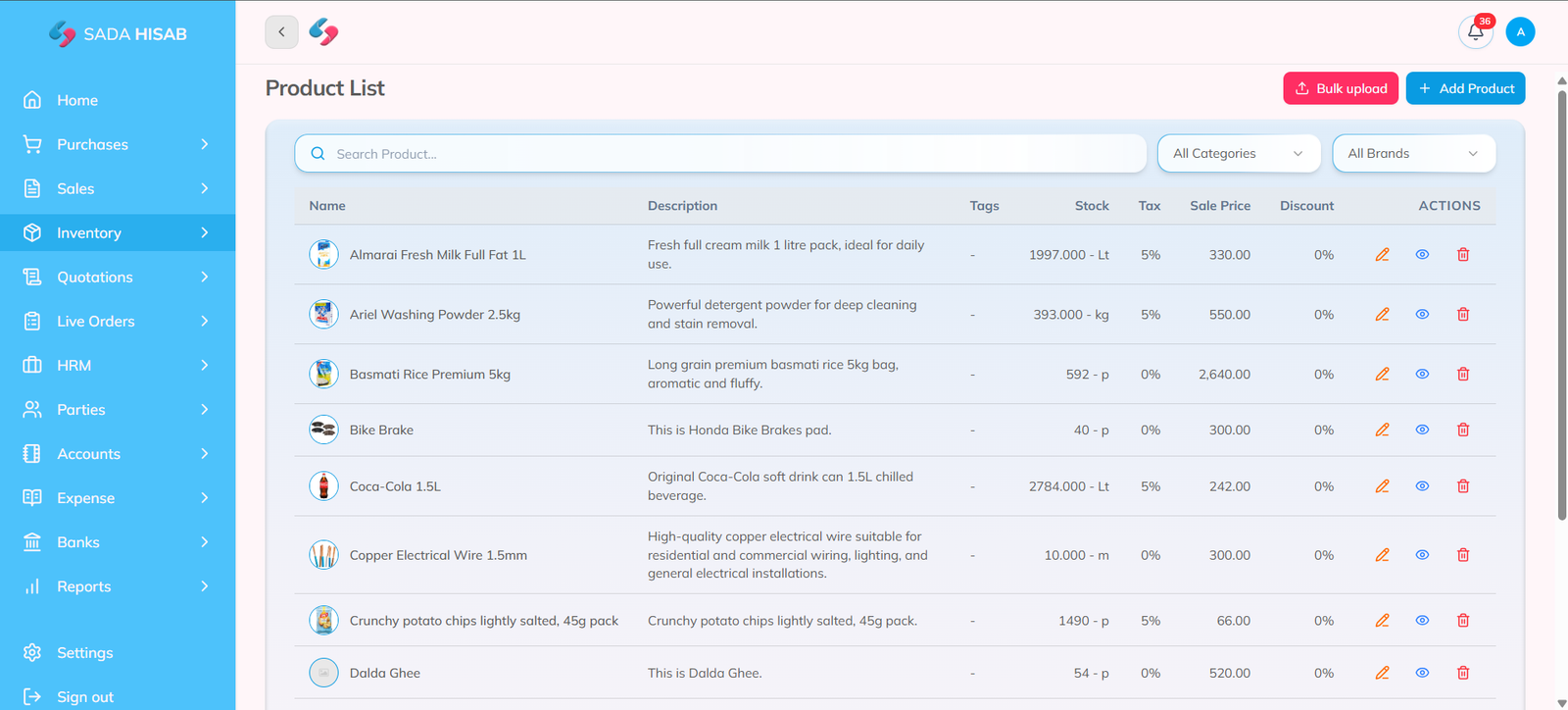
The Sada Hisab Integration for WooCommerce is designed around this workflow. Products maintained in Sada Hisab can be pulled into WooCommerce, including product images.
This means a business owner can manage products from Sada Hisab and synchronize them with the online store instead of manually rebuilding the entire catalog inside WordPress.
This can be particularly useful for businesses with large product catalogs or businesses that already use Sada Hisab as their central POS and ERP platform.

Bulk Product Management for WooCommerce
Adding products individually can become one of the most time-consuming tasks for a growing ecommerce business.
Think about a retailer with 500 products. Each product may require a name, price, category, image, stock quantity, SKU, and other information. Entering all of this manually into WooCommerce can take considerable time.
A centralized ERP or POS system can simplify the process by allowing products to be managed from the business-management system and then synchronized with WooCommerce.
With the Sada Hisab integration, products can be pulled from Sada Hisab into WooCommerce, including their images. This provides a practical workflow for businesses that want to maintain their product catalog from their central business system.
WooCommerce Order Management Through Sada Hisab
Orders are where a WooCommerce integration can become much more valuable.
A WooCommerce store can receive orders from customers at any time. But receiving an order is only the beginning. The business still needs to process it, create the relevant invoice, manage stock, record the sale, and potentially deal with returns.
WooCommerce’s current Orders API supports creating, viewing, updating, and deleting orders, with order statuses including pending, processing, on-hold, completed, cancelled, refunded, and failed.
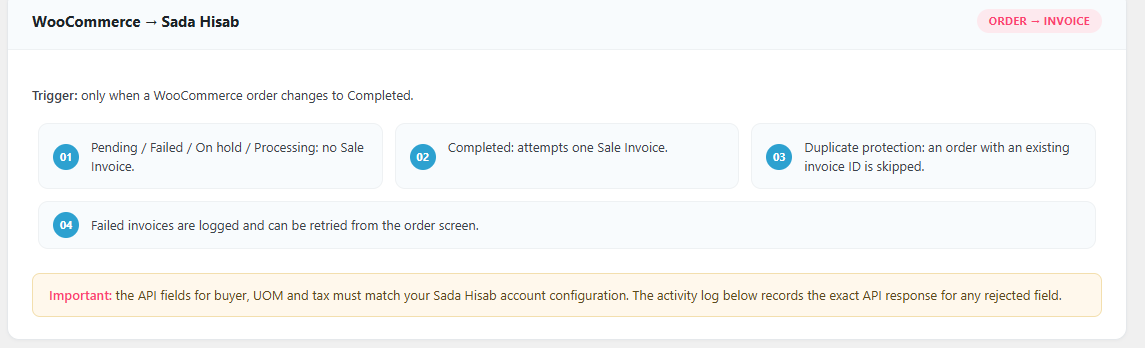
The Sada Hisab integration connects this WooCommerce order workflow with Sada Hisab’s invoicing environment. When a WooCommerce order reaches Completed, the plugin attempts to create a Sada Hisab Sale Invoice automatically. That means the business does not need to manually recreate every completed online order as a separate sale invoice.
How Sada Hisab WooCommerce Integration Works
The workflow is straightforward:
- Manage products in Sada Hisab
- Synchronize products with WooCommerce
- Customers browse the WooCommerce store
- Customers add products to their cart
- Customers complete checkout
- WooCommerce creates the order
- The order reaches Completed status
- Sada Hisab automatically attempts to create a Sale Invoice
- The business manages the transaction through Sada Hisab
- Sales, inventory, accounting, reporting, and returns can be managed within the wider ERP workflow
This is an important distinction between a simple order connector and a broader WooCommerce ERP integration.
The purpose is not only to transfer an order. The purpose is to connect the order with the rest of the business operation.
Automatic Invoice Generation From WooCommerce Orders
One of the key capabilities of the Sada Hisab integration is automatic invoice creation.
When a WooCommerce order changes to Completed, the plugin attempts to create a Sale Invoice in Sada Hisab.
This gives the business a defined trigger for moving a completed ecommerce transaction into its invoicing workflow.
WooCommerce’s official documentation identifies Completed as one of its order statuses, alongside Processing, On hold, Cancelled, Refunded, Failed, and others.
The Sada Hisab integration does not create the invoice for every WooCommerce status. Its documented workflow specifically triggers invoice creation when the order status changes to Completed.
That distinction gives businesses a clearer process for determining when an online order should become a finalized Sada Hisab sale invoice.
Internal link opportunity: Link digital invoicing software to Sada Hisab’s relevant digital invoicing page, such as FBR Digital Invoicing System Software in Pakistan.
What Happens If Invoice Creation Fails?
No integration should assume that every API request will always succeed.
Credentials can expire, network requests can fail, external services can temporarily become unavailable, or unexpected data can prevent an invoice from being created.
The important question is what happens next.
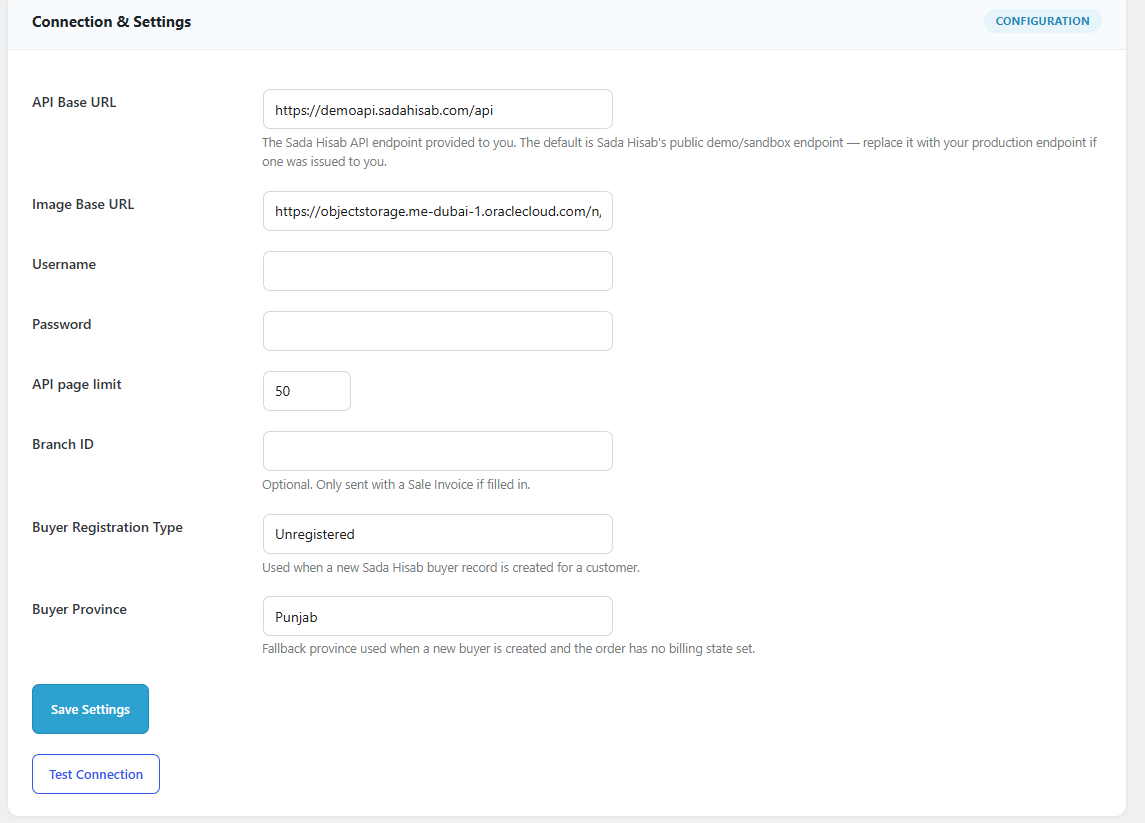
The Sada Hisab WooCommerce integration records failed invoice attempts in its Activity Log and on the relevant WooCommerce order. Administrators can then use the Retry Invoice action from the WooCommerce order screen.
This is useful because staff do not need to recreate the entire order simply because the invoice-generation request failed. Instead, they can investigate the problem and retry the invoice creation process. That creates a more controlled recovery process for businesses processing a high number of online orders.
Activity Logs for Better Integration Monitoring
An integration should not operate like a black box.
If an order does not generate an invoice, the administrator should be able to determine whether the system attempted the operation and whether an error occurred.
The Sada Hisab integration includes an on-screen Activity Log that records activities such as connection tests, synchronization runs, and invoice attempts.
The plugin documentation states that the Activity Log is stored in the website’s own WordPress database and keeps the most recent 50 entries.
This provides administrators with a convenient way to review integration activity without having to search through server logs.

WooCommerce Inventory Management With POS Integration
Inventory is one of the biggest reasons businesses adopt POS and ERP integrations. Consider a retailer selling the same product through its website and physical store. If the inventory is not managed properly, the website could display a product as available even when the actual stock has already been sold.
This creates overselling problems and additional manual work. A connected system can help businesses manage inventory from a central operational platform while using WooCommerce as the online storefront.
Sada Hisab’s wider platform includes inventory management alongside sales and accounting capabilities. Its current website describes features such as real-time inventory tracking, stock tracking, purchase orders, supplier management, barcode functionality, multi-unit packaging, batch management, and expiry tracking depending on the selected plan.
Manage WooCommerce Sales in One Business System
Your WooCommerce website records online transactions, but your business may have other sales channels too.
You might have:
- Online WooCommerce orders
- Physical retail sales
- Wholesale customers
- Sales representatives
- Multiple branches
- Direct business orders
Managing these channels independently makes it harder to understand total business performance. An ERP-backed POS system can provide a central environment for managing sales information.
Sada Hisab positions its platform around sales, inventory, and accounts in one system, allowing businesses to move beyond simple billing and manage wider business operations.
This is particularly useful for businesses that want their WooCommerce website to become one part of their overall sales operation rather than a completely separate system.
WooCommerce Returns and Refund Management
Returns are an important part of ecommerce management. A sale does not always end when the customer receives the product. Customers may request returns, exchange products, or receive refunds. Those activities can affect inventory, sales records, customer accounts, and financial reporting.
WooCommerce includes a Refunded order status, and its APIs provide order and refund functionality. For a business using an ERP system, the goal should be to make sure returns do not remain isolated inside the ecommerce website.
A properly managed business workflow should account for the effect of returns on the wider sales and financial records. Sada Hisab can be used as the broader business-management environment for managing sales and accounting information, helping businesses keep ecommerce activity connected with their wider operations.
Complete Accounting for WooCommerce Businesses
This is where an ERP-based integration can go beyond a basic POS connector.
Your WooCommerce dashboard can tell you how many orders you received and how much revenue was generated. But business owners often need deeper financial information.
They may need to understand:
- Revenue
- Expenses
- Profit and loss
- Customer balances
- Supplier transactions
- Cash and bank transactions
- Ledgers
- Vouchers
- Financial reports
Sada Hisab’s platform includes accounting functionality alongside sales and inventory. Its published feature information includes profit and loss, accounting and reporting, chart of accounts, ledger, vouchers, and bank management depending on the selected plan.
This is one of the biggest differences between connecting WooCommerce to a simple POS and connecting it to a broader ERP system.
The online order can become part of a much larger business-management process.
Internal link opportunity: Link accounting software or complete accounting system to the Sada Hisab homepage or appropriate accounting feature page.
Profit and Loss Reporting
Sales numbers alone do not tell the complete story.
A business could generate high sales but still have weak profitability because of product costs, expenses, discounts, returns, salaries, operational costs, and other financial obligations.
That is why profit and loss reporting is important for businesses that are serious about understanding their financial performance.
When ecommerce activity is connected to an ERP environment, sales information can be analyzed alongside other business records rather than remaining isolated inside WooCommerce.
Sada Hisab includes profit and loss reporting within its broader accounting and reporting functionality.
This gives business owners a clearer path from:
WooCommerce Order → Sale → Invoice → Accounting → Financial Report
rather than stopping at:
WooCommerce Order → Revenue Number
WooCommerce POS Integration vs WooCommerce Alone
| Business Requirement | WooCommerce Alone | WC + Sada Hisab |
|---|---|---|
| Online storefront | Yes | Yes |
| Ecommerce checkout | Yes | Yes |
| Product management | Yes | Yes |
| Centralized POS/ERP management | Limited | Yes |
| Product synchronization | Requires integration | Yes |
| Bulk catalog workflow | Available through WooCommerce tools/extensions | Supported through integration workflow |
| Online order management | Yes | Yes |
| Automatic Sada Hisab Sale Invoice | No | Yes |
| Inventory management | Available | Yes |
| Sales management | Ecommerce-focused | Broader business workflow |
| Returns management | WooCommerce-based | Connected with wider business operations |
| Accounting | Requires suitable setup | ERP accounting environment |
| Profit & loss | Requires accounting/reporting setup | Available through Sada Hisab |
| Integration activity log | Depends on plugin | Yes |
| Failed invoice retry | Not applicable | Yes |
The purpose of the integration is not to replace WooCommerce.
WooCommerce remains the online storefront. Sada Hisab becomes the connected business-management layer behind it.
Why Sada Hisab Is More Than a Basic WooCommerce Connector
A basic connector may simply copy an order from WooCommerce into another system.
That can be useful, but it does not necessarily solve the complete operational problem.
A business sale can affect multiple areas simultaneously:
Order → Invoice → Inventory → Sales → Customer → Return → Accounting → Reports
Sada Hisab is positioned as an ERP-based POS platform rather than only a billing application. Its current platform information lists sales, inventory, accounts, customer management, purchase management, reporting, POS billing, and ecommerce integration among its capabilities.
That broader structure makes the WooCommerce integration more relevant for businesses that want to connect their online store with their complete operational workflow.
WooCommerce HPOS Compatibility
Another technical factor businesses should consider is High-Performance Order Storage (HPOS).
WooCommerce describes HPOS as a newer way of storing orders designed to improve performance and scalability for stores with large numbers of orders.
This matters because WooCommerce plugins that interact with orders should be designed around supported WooCommerce APIs and current storage architecture.
The Sada Hisab plugin documentation states that it declares compatibility with WooCommerce custom order tables and accesses order information through WooCommerce’s CRUD API.
For a business owner, the takeaway is simple: when evaluating a WooCommerce integration, don’t only look at marketing features. Check whether the plugin is compatible with the current WooCommerce technical environment.
How to Choose a WooCommerce POS Integration in 2026
Before installing a WooCommerce POS integration, evaluate the complete workflow.
Product Management
Can you create and manage products efficiently? Can the system handle a large catalog? Can product images and relevant information be synchronized?
Order Management
How are WooCommerce orders handled? Does the system support the statuses and workflows your business uses?
Invoice Automation
Can completed WooCommerce orders automatically create invoices? What happens if invoice creation fails?
Inventory
Can your business maintain accurate stock records across ecommerce and other sales channels?
Returns
Does the integration support the wider business impact of refunds and returns?
Accounting
Can online sales become part of your accounting workflow?
Reporting
Can you analyze sales, expenses, profit and loss, and other financial information?
Error Handling
Does the plugin provide activity logs and retry mechanisms?
WooCommerce Compatibility
Does it support modern WooCommerce technologies such as HPOS and current APIs? These questions are more useful than simply asking whether a plugin has “WooCommerce integration.”
Sada Hisab WooCommerce Integration: Complete Workflow
For a business using Sada Hisab, the workflow can be summarized as follows:
1. Manage Products
Create and manage products in Sada Hisab.
2. Sync Products
Pull Sada Hisab products into WooCommerce, including available product images.
3. Receive Online Orders
Customers browse products and place orders through the WooCommerce store.
4. Process the Order
The store owner or staff manages the order through the WooCommerce workflow.
5. Complete the Order
When the order reaches Completed, the integration attempts to create a Sale Invoice in Sada Hisab.
6. Manage the Business Transaction
The transaction becomes part of the wider Sada Hisab business-management workflow.
7. Manage Inventory and Sales
The business can continue managing its inventory and sales operations through Sada Hisab.
8. Handle Returns
Returned transactions can be managed as part of the wider sales and financial workflow.
9. Review Reports
Business owners can use sales, inventory, accounting, and profit/loss reporting to understand business performance.
This creates a connected workflow instead of forcing employees to repeatedly copy information from one platform to another.
Conclusion
A WooCommerce store can handle the customer-facing side of ecommerce, but growing businesses often need much more than an online checkout system. Products, orders, inventory, invoices, sales, returns, accounting, and reporting all become connected parts of the same business operation.
A well-designed WooCommerce POS integration can connect these processes and reduce the need for repetitive manual data entry.
The Sada Hisab WooCommerce integration takes this approach by connecting WooCommerce with a broader POS and ERP environment. Businesses can manage products through Sada Hisab, pull products into WooCommerce, receive online orders, and automatically attempt to create a Sale Invoice when an order reaches Completed status. Failed invoice attempts can be logged and retried, while the wider Sada Hisab platform provides functionality for inventory, sales, accounting, reporting, returns, and profit and loss.
For businesses already using Sada Hisab, this integration provides a way to bring their WooCommerce store into the same business-management workflow rather than maintaining ecommerce and back-office operations as completely separate systems.
Ready to connect your WooCommerce store with your POS, inventory, sales, and accounting system? Explore Sada Hisab and see how WooCommerce integration can simplify your daily business operations. Book a free demo with Sada Hisab to discuss your requirements.